




Headless CMS vs WordPress: When to Make the Switch
A practical guide to understanding when WordPress still makes sense, when to go headless, and how to migrate. Real trade-offs from someone who's done both.
After spending years building with both WordPress and headless CMS platforms, I've seen the full spectrum of projects—from simple blogs where WordPress shines to complex multi-platform content systems where headless is the only sensible choice.
This guide will help you understand when WordPress still makes sense, when to go headless, and how to make the transition if you decide it's time.
The Real Difference: It's About Architecture
Let's cut through the marketing and get to the core difference:
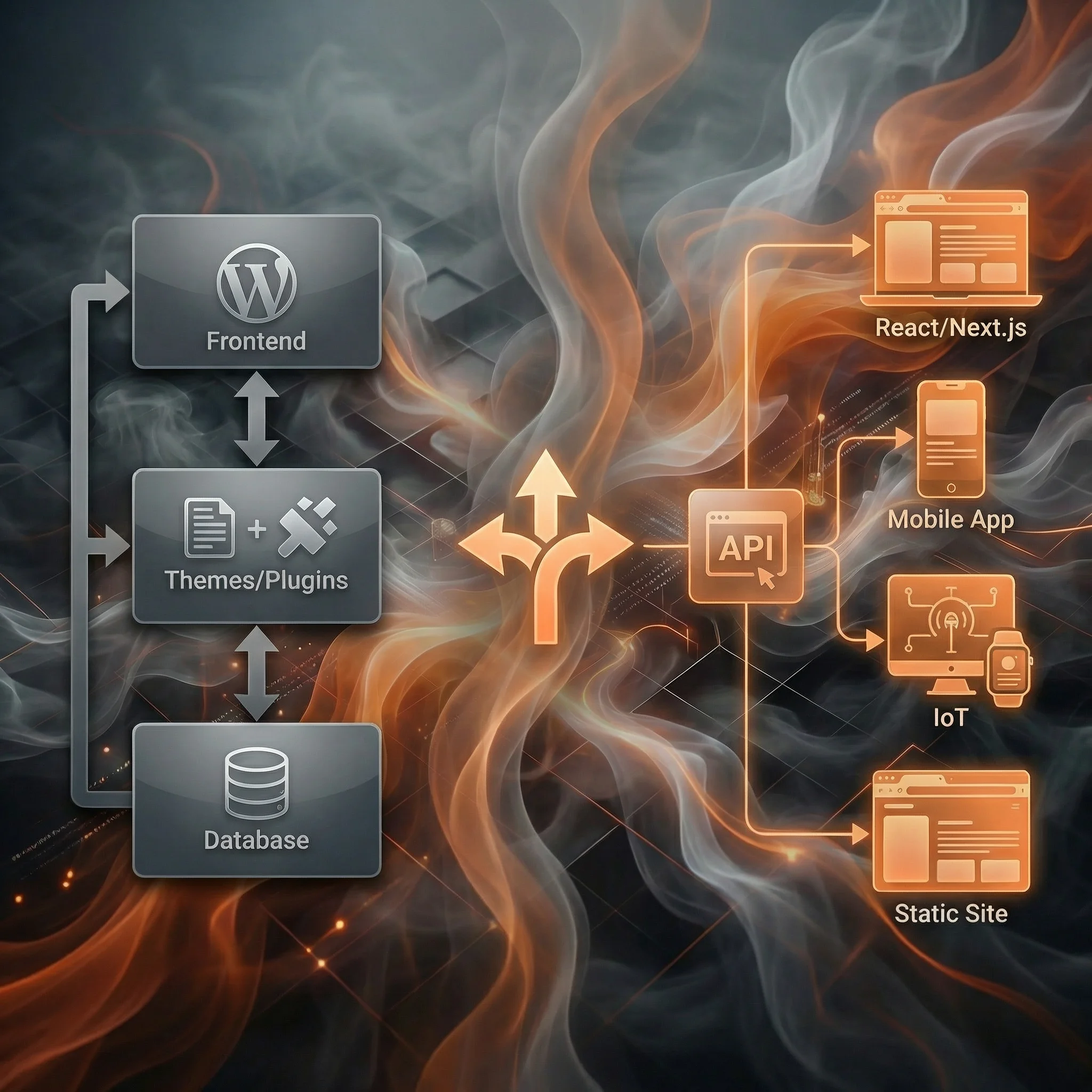
WordPress is a monolithic system. Your content, your presentation, your plugins, your themes—they all live together in one interconnected system. Change one thing, and it can ripple through everything else.
Headless CMS separates content from presentation completely. Your content lives in one system (the CMS), and your frontend lives elsewhere (Next.js, React, mobile apps, etc.). They communicate through APIs.
┌─────────────────────────────────────────────────────────────────┐
│                        WORDPRESS                                │
│                    (Monolithic System)                          │
├─────────────────────────────────────────────────────────────────┤
│                                                                 │
│   ┌──────────────────────────────────────────────────────┐     │
│   │                                                      │     │
│   │   Database ←→ PHP Backend ←→ Theme/Templates        │     │
│   │                    ↓                                 │     │
│   │               Plugins (1000s available)              │     │
│   │                                                      │     │
│   └──────────────────────────────────────────────────────┘     │
│                              ↓                                  │
│                    Single Website Output                        │
│                                                                 │
└─────────────────────────────────────────────────────────────────┘

┌─────────────────────────────────────────────────────────────────┐
│                      HEADLESS CMS                               │
│                   (Decoupled System)                            │
├─────────────────────────────────────────────────────────────────┤
│                                                                 │
│   ┌─────────────────────┐                                      │
│   │   CONTENT LAYER     │                                      │
│   │   (Sanity/etc)      │                                      │
│   └──────────┬──────────┘                                      │
│              │ API                                              │
│    ┌─────────┼─────────┬─────────────┐                        │
│    ▼         ▼         ▼             ▼                        │
│ ┌──────┐ ┌──────┐ ┌─────────┐ ┌──────────┐                   │
│ │Next.js│ │Mobile│ │ Other  │ │  Future  │                   │
│ │ Site │ │ App  │ │Channels│ │ Platforms│                   │
│ └──────┘ └──────┘ └─────────┘ └──────────┘                   │
│                                                                 │
└─────────────────────────────────────────────────────────────────┘
Neither is inherently better. They're different tools for different jobs.
When WordPress Is Still the Right Choice
Don't let anyone tell you WordPress is "dead" or "outdated." For certain use cases, it's still excellent:
✅ WordPress Makes Sense When:
1. You have limited technical resources
WordPress's admin interface is intuitive. Non-technical users can install themes, add plugins, and manage content without writing code. Headless CMS always requires developer involvement for the frontend.
2. You need to launch quickly on a budget
With WordPress, you can have a professional site live in days using pre-built themes. The ecosystem of themes and plugins is massive. A comparable headless setup requires custom frontend development.
3. Your content lives on one website only
If you're building a blog, portfolio, or small business site—and that's the only place your content will ever appear—WordPress's coupling of content and presentation isn't a limitation.
4. You need specific functionality via plugins
Need e-commerce? WooCommerce. Need memberships? MemberPress. Need bookings? Amelia. WordPress's plugin ecosystem is hard to beat. Headless often means building these features custom or integrating multiple services.
5. Your team already knows WordPress
If your content team has years of WordPress experience, there's real value in that familiarity. The learning curve for a new CMS isn't just about features—it's about workflow disruption.
When to Go Headless
Now, here's when WordPress starts to show its limits:
✅ Headless Makes Sense When:
1. You need content on multiple platforms
The moment you need the same content on a website AND a mobile app AND a kiosk AND an email newsletter... WordPress becomes a liability. Headless CMS treats content as data that can flow anywhere.
2. Performance is critical
WordPress sites can be fast, but it requires effort—caching plugins, CDN configuration, database optimization. Headless with Next.js gives you static generation and edge deployment out of the box. Sub-second load times become the default, not the exception.
3. You're building with modern frameworks
If your team works in React, Vue, or Svelte, headless CMS fits naturally into your workflow. You get type safety, component architecture, and modern tooling. WordPress's PHP templates feel dated by comparison.
4. You need structured, queryable content
WordPress stores content as "posts" with HTML blobs. Headless CMS stores structured data—you can query for "all products where price < $100 and category = 'electronics'". This flexibility is transformative for dynamic applications.
5. Security and scalability are priorities
WordPress sites are common attack targets because they're common. The frontend and backend together mean more attack surface. Headless separates concerns—your content API can be locked down, and your static frontend has no server to hack.
6. You're frustrated by WordPress maintenance
Plugin conflicts, theme updates that break things, PHP version compatibility... If you're spending significant time on WordPress maintenance, headless can simplify your operational burden.
The Migration Path: A Realistic Overview
If you've decided to make the switch, here's what the process actually looks like:
Phase 1: Planning (1-2 weeks)
Content Audit
- Export your WordPress content (use WP All Export or the built-in exporter)
- Identify content types: Posts, pages, custom post types
- Map WordPress fields to your new content model
- Identify media/assets that need migration
Choose Your Stack
- Select a headless CMS (my recommendations here)
- Decide on frontend framework (Next.js is my default choice)
- Plan hosting (Vercel, Netlify, etc.)
Phase 2: Content Modeling (1 week)
Design your new content structure. This is crucial—good content modeling sets you up for success.
// Example: Migrating WordPress posts to Sanity
// WordPress has: title, content, excerpt, featured_image, categories, tags
// Sanity schema might be:

export default {
  name: "post",
  type: "document",
  fields: [
    { name: "title", type: "string" },
    { name: "slug", type: "slug", options: { source: "title" } },
    { name: "excerpt", type: "text" },
    { name: "body", type: "array", of: [{ type: "block" }] }, // Portable Text
    { name: "featuredImage", type: "image" },
    {
      name: "categories",
      type: "array",
      of: [{ type: "reference", to: [{ type: "category" }] }],
    },
    { name: "publishedAt", type: "datetime" },
  ],
};
Phase 3: Content Migration (1-2 weeks)
Option A: Manual Migration For small sites (<50 pages), manual migration might be fastest. Copy content piece by piece, improving it along the way.
Option B: Scripted Migration For larger sites, write a migration script:
// Pseudo-code for WordPress to Sanity migration
import { createClient } from "@sanity/client";
import wpContent from "./wordpress-export.json";

const sanity = createClient({
  /* config */
});

for (const post of wpContent.posts) {
  await sanity.create({
    _type: "post",
    title: post.title,
    slug: { current: post.slug },
    body: convertHtmlToPortableText(post.content),
    publishedAt: post.date,
    // ... map other fields
  });
}
Option C: Migration Tools Some CMS platforms offer WordPress migration tools:
- Sanity has community migration packages
- Contentful has official WordPress importers
- Strapi has migration plugins
Phase 4: Frontend Development (2-4 weeks)
Build your new frontend. With Next.js, you'll:
- Create page templates for each content type
- Implement the design (or adapt your existing design)
- Set up dynamic routing for blog posts, categories, etc.
- Configure ISR for optimal performance
Phase 5: Launch & Redirect (1 week)
Preserve SEO
- Maintain the same URL structure where possible
- Set up 301 redirects for any changed URLs
- Update your sitemap
- Resubmit to Google Search Console
Monitor
- Watch for 404 errors in analytics
- Monitor Core Web Vitals
- Check rankings for key pages
Real-World Migration Timelines
Based on projects I've worked on:
| Site Complexity | WordPress Pages | Migration Time | Typical Cost |
|---|---|---|---|
| Simple Blog | <50 | 2-3 weeks | $3,000-$8,000 |
| Business Site | 50-200 | 4-6 weeks | $10,000-$25,000 |
| E-commerce | 200+ products | 6-10 weeks | $25,000-$60,000 |
| Enterprise | 500+ pages | 3-6 months | $50,000+ |
These are estimates—your mileage will vary based on custom functionality, design requirements, and team capacity.
The Hybrid Approach: WordPress as Headless CMS
There's a middle path: using WordPress as a headless CMS. WordPress has a REST API (and GraphQL via plugins) that can serve content to a separate frontend.
Pros:
- Keep your existing content and admin experience
- Gradually modernize your frontend
- Content team doesn't need to learn new tools
Cons:
- You still maintain WordPress (plugins, updates, security)
- WordPress's content model is still limited
- You're not getting the full benefits of purpose-built headless CMS
I generally recommend this approach only as a transitional step, not a permanent solution.
My Honest Take
After migrating dozens of sites from WordPress to headless:
The migration is worth it if:
- You're building a new version of your site anyway
- Performance matters to your business
- You need content flexibility
- You have developer resources
The migration is NOT worth it if:
- Your current WordPress site works fine
- You don't have technical resources
- Your content team loves WordPress
- Budget is extremely tight
The grass isn't always greener. I've seen companies migrate to headless and thrive. I've also seen companies migrate and struggle because they underestimated the operational changes.
Be honest about your situation. If you're not sure, reach out—I'm happy to chat through your specific case.
Next Steps
If you're leaning toward headless, here's your reading list:
- What is a Headless CMS? - Understand the fundamentals
- Best Headless CMS Platforms in 2026 - Compare your options
- Content Modeling Best Practices - Plan your structure
- Why Sanity is My Go-To CMS - My recommended stack
And if you want help with your migration, let's talk.