




Headless CMS Explained Simply: What It Means for Your Business
No tech jargon, just clear business benefits. Learn what a headless CMS actually is, why companies are switching, and whether it's right for your business.
Headless CMS Explained Simply: What It Means for Your Business
You've probably heard the term "headless CMS" thrown around in meetings or seen it in proposals from web agencies. But what does it actually mean? And more importantly, should you care?
Let me explain it in plain English—no developer jargon required.
The Restaurant Analogy
Imagine a restaurant kitchen. In a traditional setup, the kitchen is attached to one dining room. The chef cooks, and the food goes directly to tables in that single space.
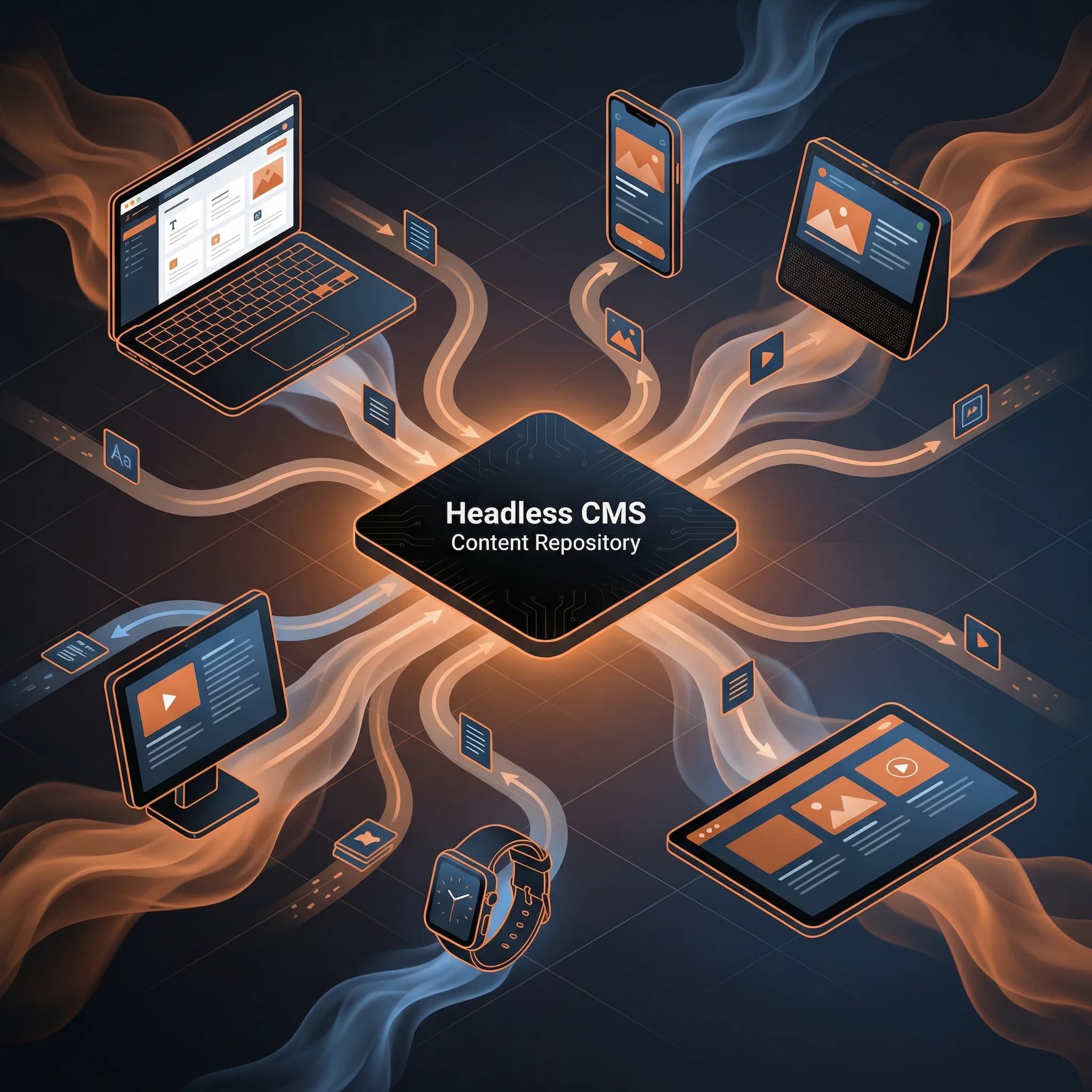
Now imagine a central kitchen that serves multiple venues: a fine dining room, a casual café, a food truck, and delivery orders—all from the same menu and recipes.
That's headless CMS.
- The kitchen = Your content (articles, product descriptions, images)
- The dining rooms = Where people see it (website, mobile app, in-store displays)
- Traditional CMS = Kitchen attached to one room
- Headless CMS = Central kitchen serving everywhere
What's Wrong With Traditional CMS?
WordPress and similar platforms were built for a simpler time when you only needed a website. They work like this:
- You write content in WordPress
- WordPress displays it on your website
- That's it—one content, one destination
The problems start when you need more:
| Challenge | Traditional CMS | Headless CMS |
|---|---|---|
| Mobile app needs content | Rebuild everything | Same content, new display |
| Website redesign | Risk breaking content | Change display only |
| Add in-store kiosk | Separate system entirely | Connect to existing content |
| Multiple languages | Plugin complexity | Built-in support |
| Performance speed | Often slow | Typically 2-5x faster |
The Business Benefits (In Real Numbers)
Let's talk about what actually matters: results.
1. Faster Websites = More Conversions
Studies consistently show:
- 1 second delay = 7% reduction in conversions
- 3+ second load time = 53% of visitors leave
Headless sites typically load in under 1 second because they use modern technology designed for speed. One of my e-commerce clients saw a 23% increase in sales after migrating to headless—primarily from improved mobile speed.
2. Content Team Independence
How often does this happen?
- Marketing wants to update the homepage
- They submit a ticket to IT
- IT is busy with other projects
- Update happens... eventually
With a modern headless setup, content teams can:
- Update any text or image instantly
- Preview changes before publishing
- Schedule content for specific dates
- No developer required for content changes
Average time saved: 5-10 hours per week for active marketing teams.
3. Future-Proof Investment
Technology changes fast. The website you build today needs to work with:
- Tomorrow's devices (AR glasses? Voice assistants?)
- New marketing channels
- Different regions and languages
- Integration with new tools
Headless architecture means your content is stored separately from how it's displayed. New channel? New device? Connect it to your existing content—no rewrite required.
4. Lower Long-Term Costs
Traditional CMS sites often become expensive to maintain:
- Security patches
- Plugin updates breaking things
- Performance optimization
- Hosting costs for slow sites
Headless sites are:
- More secure (smaller attack surface)
- Fewer moving parts to maintain
- Cheaper to host (static files)
- Less prone to breaking
Typical 3-year TCO reduction: 30-40% compared to traditional CMS.
When Headless Makes Sense
Headless is a great fit if you:
✅ Publish content to multiple platforms (web, app, email) ✅ Need fast website performance ✅ Want marketing team independence ✅ Plan significant growth or redesigns ✅ Have complex content relationships ✅ Need real-time content updates
When to Stick With Traditional
Headless might be overkill if:
❌ You only need a simple blog ❌ Budget is extremely limited ❌ No plans for mobile apps or multi-channel ❌ Content updates are rare (a few times per year) ❌ You need extensive plugin ecosystems (membership sites, forums)
What Migration Actually Looks Like
Worried about the switch? Here's what a typical migration involves:
Week 1-2: Planning
- Audit existing content
- Design new content structure
- Choose the right headless platform
Week 3-6: Development
- Build new website frontend
- Set up headless CMS
- Migrate content
Week 7-8: Testing & Launch
- Team training
- Quality assurance
- Go live
Your existing content is preserved. We're changing where it lives and how it's displayed—not starting from scratch.
The Bottom Line
A headless CMS separates your content from your website design. This means:
- Faster websites that convert better
- Independent content teams that move quickly
- Future-proof architecture that grows with you
- Lower long-term costs through reduced maintenance
It's not about technology for technology's sake—it's about building a foundation that lets your business move faster.
Related Reading:
- 10 Best Headless CMS Platforms for 2026 — Compare specific platforms once you understand the concept
- 7 Signs Your Website is Costing You Customers — Is your current site holding you back?
Ready to Explore?
I help businesses evaluate whether headless is right for them. No pressure, no jargon—just honest advice based on your specific situation.
Schedule a free 30-minute consultation to discuss your website goals.
Have questions about headless CMS? Get in touch—I'm happy to explain anything in more detail.